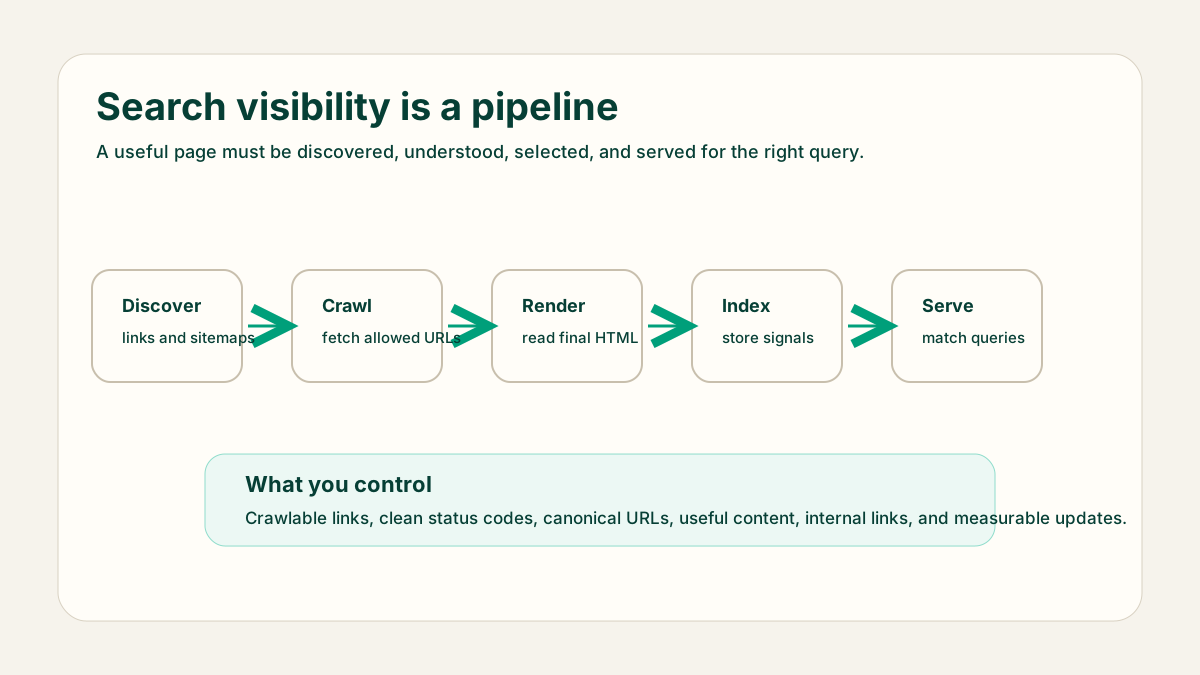
Search engines feel mysterious because the result page hides a long technical process. A page does not appear because it was published. It has to be discovered, fetched, understood, stored, selected for a query, and useful enough to deserve the click. For a small site, understanding that pipeline makes SEO work calmer: you can check the stage that is failing instead of guessing.
The short version
Search engines use crawlers to find URLs from links, sitemaps, redirects, and previously known pages. They fetch allowed URLs, render enough of the page to understand the final HTML, decide whether the page should be indexed, choose canonical versions when duplicates exist, and then serve matching pages when a user searches.
- Discovery answers: how did the crawler find this URL?
- Crawling answers: can the crawler fetch the URL successfully?
- Rendering answers: is the important content visible in the rendered page?
- Indexing answers: is this page stored as a search candidate?
- Serving answers: does this page match a real query better than alternatives?
Discovery and crawling
Discovery usually starts with links. A sitemap can help, but a page should still be reachable from normal navigation, related guides, category pages, or useful internal links. Crawling then depends on status codes, robots.txt rules, server availability, redirects, and whether the crawler decides the URL is worth fetching now.
Crawl check
URL: /blog/seo/how-search-engines-work
Status: 200
Linked from: /blog and related SEO guides
Canonical: self-referencing
Sitemap: include only after publish date
Robots.txt: not blocked
Rendering and indexing
Rendering matters when important content depends on client-side JavaScript. A content site should send useful HTML from the server whenever possible. After rendering, the search engine decides whether to index the page. Thin pages, duplicates, blocked resources, confusing canonicals, noindex directives, and weak content can keep a URL out of the index.
Canonical selection
When several URLs look similar, search engines may choose one canonical URL to represent the group. Help that decision with stable URLs, self-referencing canonicals, consistent internal links, and clean redirects. Do not create many near-identical pages for small keyword variations; build one strong page when the intent is the same.
Serving results
Serving is the stage people usually call ranking. The search engine compares the query, location, language, freshness needs, page content, links, quality signals, and many other factors. You cannot control the whole system, but you can make the page easier to understand and more useful for the query it targets.
What to check in Search Console
Search Console is useful when you read it by pipeline stage. A URL inspection tells you whether Google knows the URL, which canonical was selected, whether crawling is allowed, and whether the page can be indexed. Performance reports tell you which queries and pages already have impressions. Do not treat low clicks as one generic problem; first separate discovery, indexing, relevance, and click-through issues.
- If the URL is unknown, improve internal links and sitemap inclusion.
- If crawling failed, inspect status codes, redirects, DNS, and robots.txt.
- If a different canonical was selected, compare duplicate URLs and internal links.
- If impressions exist but clicks are weak, review title, snippet promise, and page match.
Avoid wrong conclusions
A page with no traffic is not automatically a bad page. It may be undiscovered, blocked, too new, duplicated under another canonical, or targeting a query with very little demand. A page with impressions but no clicks has a different problem from a page with no impressions. Debug the stage before rewriting the article.
This is why technical checks and content checks belong together. Crawling and indexing confirm the page can enter the system. Content quality, intent match, internal links, and snippets decide whether the page deserves attention once it is eligible.
Beginner debugging order
- Check that the page returns a 200 status and is not blocked.
- Confirm the page is linked internally from relevant pages.
- Inspect the rendered HTML and make sure the main answer is present.
- Check canonical and noindex signals before changing content.
- Use query data after the page is indexed; do not optimize blindly on day one.
Final recommendation
Before asking why a page does not rank, ask whether it was discovered, crawled, rendered, indexed, and selected for the right query. That order turns search engine behavior into a practical checklist and prevents random SEO changes.