Search engines mysterious लगते हैं क्योंकि result page के पीछे लंबी technical process छिपी होती है। Page सिर्फ publish होने से appear नहीं होता। उसे discover, fetch, understand, store, query के लिए select और click deserve करने लायक useful होना पड़ता है। छोटी site के लिए यह pipeline समझना SEO work को calm बनाता है।
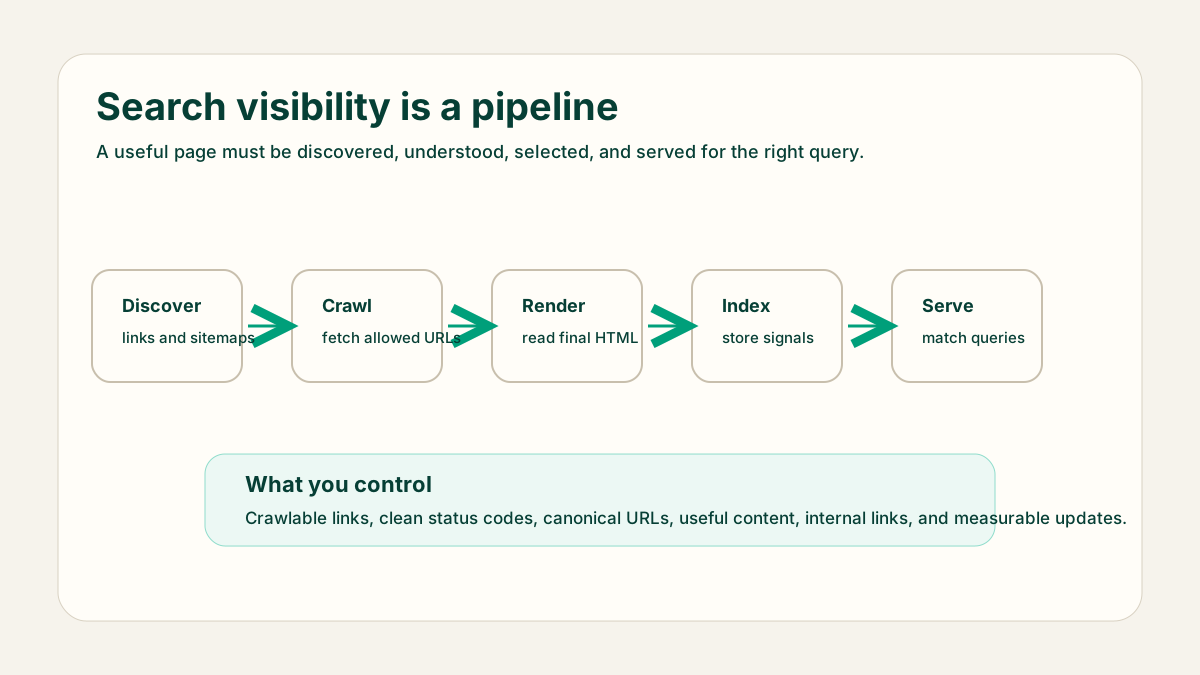
Short version
Search engines links, sitemaps, redirects और पहले से known pages से URLs find करते हैं। वे allowed URLs fetch करते हैं, final HTML समझने के लिए render करते हैं, decide करते हैं कि page index होना चाहिए या नहीं, duplicate pages में canonical version चुनते हैं और user query आने पर matching pages serve करते हैं।
- Discovery: crawler ने URL कैसे find किया?
- Crawling: crawler URL successfully fetch कर सकता है?
- Rendering: important content rendered page में दिख रहा है?
- Indexing: page search candidate के रूप में store है?
- Serving: page real query से बेहतर match करता है?
Discovery और crawling
Discovery आम तौर पर links से शुरू होती है। Sitemap मदद कर सकता है, लेकिन page normal navigation, related guides, category pages या useful internal links से reachable होना चाहिए। Crawling status codes, robots.txt rules, server availability, redirects और crawler की priority पर depend करती है।
Crawl check
URL: /blog/seo/how-search-engines-work
Status: 200
Linked from: /blog and related SEO guides
Canonical: self-referencing
Sitemap: publish date के बाद ही include
Robots.txt: blocked नहीं
Rendering और indexing
Rendering तब important है जब main content client-side JavaScript पर depend करता है। Content site को useful HTML server से भेजना चाहिए। Rendering के बाद search engine decide करता है कि page index करना है या नहीं। Thin pages, duplicates, confusing canonicals, noindex directives और weak content indexing रोक सकते हैं।
Canonical selection
जब कई URLs similar लगते हैं, search engines उनमें से एक canonical URL चुन सकते हैं। Stable URLs, self-referencing canonicals, consistent internal links और clean redirects से मदद करें। Same intent के लिए छोटी keyword variations पर अलग-अलग pages न बनाएं।
Results serve करना
Serving वही stage है जिसे लोग ranking कहते हैं। Search engine query, language, freshness need, page content, links, quality signals और कई factors compare करता है। पूरा system control नहीं होता, लेकिन page को target query के लिए ज्यादा useful और understandable बनाया जा सकता है।
Search Console में क्या check करें
Search Console तब useful है जब आप उसे pipeline stage के हिसाब से पढ़ते हैं। URL inspection बताता है कि Google URL को जानता है या नहीं, कौन सा canonical selected है, crawling allowed है या नहीं और page index हो सकता है या नहीं। Performance reports बताती हैं कि किन queries और pages को impressions मिल रहे हैं। Low clicks को एक generic problem न मानें; पहले discovery, indexing, relevance और click-through issues अलग करें।
- URL unknown हो तो internal links और sitemap inclusion improve करें।
- Crawling failed हो तो status codes, redirects, DNS और robots.txt inspect करें।
- Different canonical selected हो तो duplicate URLs और internal links compare करें।
- Impressions हैं लेकिन clicks weak हैं तो title, snippet promise और page match review करें।
Wrong conclusions से बचें
जिस page पर traffic नहीं है वह automatically bad page नहीं है। वह undiscovered, blocked, too new, किसी दूसरे canonical के नीचे duplicate या बहुत low-demand query target कर सकता है। जिस page को impressions हैं लेकिन clicks नहीं, उसकी problem no-impression page से अलग है। Article rewrite करने से पहले stage debug करें।
इसीलिए technical checks और content checks साथ चलते हैं। Crawling और indexing confirm करते हैं कि page system में enter कर सकता है। Content quality, intent match, internal links और snippets decide करते हैं कि eligible होने के बाद page attention deserve करता है या नहीं।
Beginner debugging order
- Check करें कि page 200 status देता है और blocked नहीं है।
- Relevant pages से internal links confirm करें।
- Rendered HTML में main answer present है या नहीं देखें।
- Content बदलने से पहले canonical और noindex signals check करें।
- Page indexed होने के बाद query data use करें; day one पर blind optimization न करें।
अंतिम सुझाव
Page rank क्यों नहीं कर रहा, यह पूछने से पहले पूछें कि वह discovered, crawled, rendered, indexed और सही query के लिए selected है या नहीं। यह order search behavior को practical checklist में बदल देता है।