Google Analytics for SEO: A Practical GA4 Guide is useful when it helps a real reader or operator make a better decision, not when it adds another isolated SEO tactic. For arjns-style publishing, the page should explain the problem, show the practical workflow, name the risks, and give a repeatable way to review the result. Use search performance data for pre-click visibility and GA4 for behavior after the site loads. Their clicks and sessions are not interchangeable, so compare aligned trends and connect each landing page to a meaningful reader outcome instead of forcing both systems to show the same total.
The useful role of GA4 in SEO
GA4 explains what measurable activity happened after a visitor reached the site; search performance tools explain how pages appeared and were clicked before arrival. Use an organic landing-page view to connect sessions with engaged reading, completed tools, subscriptions, purchases, or another explicitly defined outcome. Do not reconcile search clicks to GA4 sessions as if they were two ledgers: consent, tag loading, repeat clicks, attribution rules, and reporting time zones make exact equality an invalid goal.
Decisions this setup should support
A useful setup should help an editor decide what to investigate or improve, not merely produce a dashboard.
- Distinguish acquisition dimensions scoped to a session from dimensions describing a user's earlier acquisition.
- Explain a click-to-session gap using collection hypotheses instead of declaring either system wrong.
- Pair every reported metric with a decision, an owner, and the date on which the result will be reviewed.
Diagnose the SEO measurement question first
Start by separating the user need from the search engine signal. The user need is what the page must solve. The search signal is how crawlers and ranking systems understand that solution. If the page only chases the signal, it becomes thin. If it only helps the reader but hides the structure, it can be harder to discover. The right answer is a clear page with crawlable HTML, precise metadata, useful examples, internal links, and a measurable follow-up.
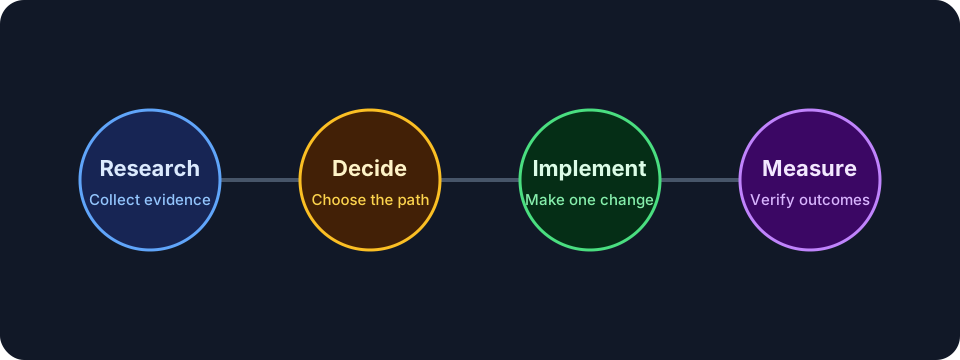
Configure an organic landing-page workflow
- Verify the correct web stream, tag coverage, internal-traffic rules, referral exclusions, consent behavior, and reporting time zone.
- Mark only meaningful completions, such as a finished tool result or purchase, as key events.
- Build an organic landing-page view with session-scoped acquisition dimensions.
- Connect the matching search property so query visibility and on-site behavior can be reviewed together.
- Segment by device, country, page type, and new or returning audience before interpreting a change.
- Record the evidence, decision, owner, release date, and next review point in a monthly worksheet.
- Document the expected search intent, the page promise, and the verification method before publishing.
- Review the rendered page on mobile because cramped layouts, hidden tables, or broken controls can turn good content into a poor experience.
Worked example: impressions, sessions, and outcomes
A monthly review shows that a guide gained search impressions while clicks stayed flat. Its organic sessions also stayed flat, but tool completions from the landing page increased. The correct conclusion is not that one platform is wrong: visibility expanded, the snippet may need review, and the visitors who did arrive completed more useful actions. Compare equivalent date ranges, annotate tracking or site releases, and investigate large click-to-session gaps without expecting exact equality.
- Write the page brief before writing the final article.
- Name the primary query group and the reader's next action.
- Check the rendered page, not only the draft data.
- Record the verification date so later reporting has context.
GA4 and search-data validation checklist
- The title, H1, summary, and first section describe the same practical outcome.
- The page includes examples or decision rules a reader can apply immediately.
- Important links are crawlable anchors with natural context.
- The sitemap includes the page only when it is live and canonical.
- The page avoids claims that cannot be verified from visible content or data.
- The review date, publish date, and next measurement point are clear to the editor.
Collection and attribution boundaries
Use decision rules to keep the work honest. A rule prevents the page from becoming a collection of SEO opinions and makes the review easier for another person. The rule should explain what to do when evidence is weak, when a page is too thin, when a signal conflicts with another signal, and when the safest answer is to wait for better data.
- If the page cannot answer a clear reader need, do not publish it as indexable content.
- If the technical signal conflicts with visible content, fix the visible content or remove the signal.
- If a section only repeats the title in different words, replace it with an example, checklist, or caveat.
- If a change cannot be verified, mark it as an editorial assumption rather than a completed fix.
- If a future page is scheduled, keep it out of public links and sitemaps until the publish date.
When GA4 cannot answer the question
Do not use GA4 as the source for complete query rankings, crawl status, index coverage, or exact voice and AI referral attribution. It also cannot recover events that a blocked tag or denied consent never collected. Use the appropriate search, crawl, server, commerce, or customer system, and document how its identifiers and date ranges relate to the landing-page report.
Analytics mistakes that distort SEO decisions
- Treating users, sessions, and search clicks as interchangeable.
- Using total traffic growth as proof that SEO caused a business outcome.
- Marking every interaction as a conversion.
- Ignoring consent, tagging, attribution, and time-zone changes.
- Optimizing engagement rate without considering the page's real task.
Read trends with a monthly decision table
Measure this work with a short feedback loop: crawl status, sitemap visibility, impressions for the intended query group, clicks and CTR when snippets change, engagement on the page, and whether the reader continues to a related guide or tool. Do not judge success from a single day of data; search systems, crawling, and reporting all move on different timelines.
GA4 and search-data validation checklist: release checks
- Confirm the canonical URL, title, meta description, headings, and language alternates.
- Open the page on mobile and desktop to check spacing, tables, diagrams, and code blocks.
- Verify the page appears in the sitemap only when it is live.
- Check that images have useful alt text and do not create layout shift.
- Add internal links from related guides after the destination page is public.
Recommendation: connect visibility to useful actions: AI review prompt
Use this prompt after you have a real URL, page draft, or crawl export. It is meant to produce fixes you can review, not automatic publishing decisions.
Act as a careful SEO implementation reviewer.
Page/topic: Google Analytics for SEO: A Practical GA4 Guide
URL or draft: [paste URL or content]
Search intent: [intent]
Review: crawlability, title, meta description, headings, content depth, examples, internal links, structured data/canonical needs, mobile UX, and measurement plan.
Return prioritized fixes with exact page sections to change.
Frequently asked questions
Why do search clicks and GA4 sessions differ?
They use different definitions and collection systems. Consent, loading, repeat clicks, attribution, and time zones can all create valid gaps.
Which GA4 view is most useful for SEO?
Start with organic landing pages, then review engagement and meaningful key events for those pages.
Can GA4 show every organic query?
No. Use dedicated search performance data for queries and GA4 for behavior after arrival.
How often should the data be reviewed?
A monthly review suits most editorial sites, with extra checks after major releases or unusual changes.
Recommendation: connect visibility to useful actions
A strong SEO page is not only optimized for a keyword. It is reachable, understandable, useful, and honest about what it can answer. Before publishing, check the rendered page, the snippet fields, internal links, indexability, and whether a reader can act without opening five more tabs.
Revisit the page when search intent changes, when the product or platform changes, when Search Console shows new query groups, or when users repeatedly need clarification. Refreshing content should make the page more accurate and useful; it should not be a cosmetic date change.