Website speed work आसान हो जाता है जब आप page load के order में काम करते हैं। Server response से शुरू करें, फिर HTML, render-blocking assets, JavaScript, images, fonts, caching और measurement देखें। Early bottlenecks से पहले late problems fix करना अक्सर effort waste करता है।
Code बदलने से पहले measure करें
Optimize करने से पहले repeatable baseline लें। Homepage, main article template, tool page और किसी heavy page को check करें। हर page का main bottleneck note करें ताकि changes real problem पर लगें।
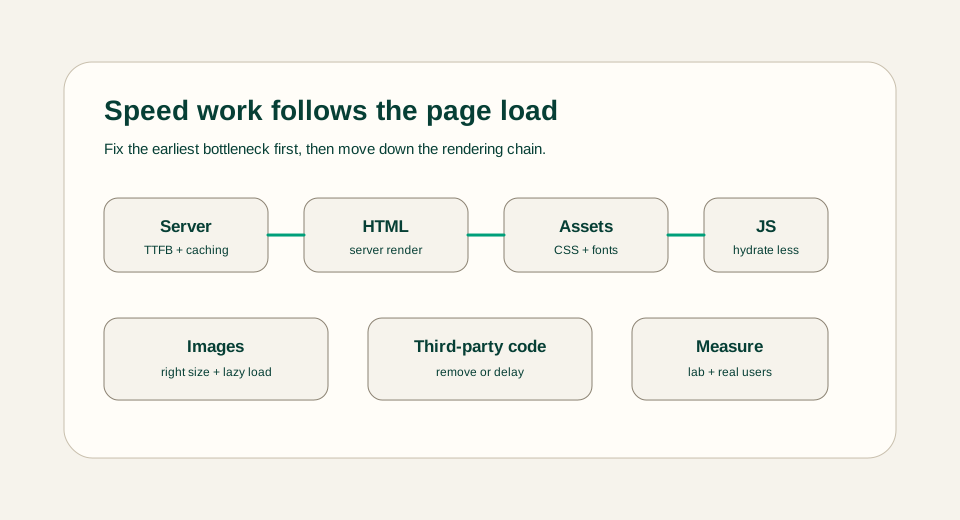
Server response और HTML से शुरुआत करें
Slow server response बाकी सब कुछ delay कर देता है। जहाँ content पहले से known हो वहाँ static generation इस्तेमाल करें, static article routes से database calls दूर रखें और optional interactive code load होने से पहले useful HTML भेजें।
- Stable content pages को pre-render करें।
- Article rendering को server-first रखें।
- जो pages HTML के रूप में useful हो सकते हैं, उन्हें client-only render न करें।
- First response slow हो तो redirects और middleware check करें।
Readers को unnecessary JavaScript न भेजें
हर Client Component JavaScript work जोड़ता है। Interactive logic को tools, forms, filters और controls तक focused रखें जिन्हें browser state चाहिए। Article layouts, content access, related posts और static sections जहाँ संभव हो server-first रहें।
Images, fonts और CSS optimize करें
Images अपने container के हिसाब से सही size की, compressed और first viewport से नीचे होने पर lazy-loaded होनी चाहिए। Fonts limited रखें और इस तरह load करें कि layout shift न हो। CSS design support करे, लेकिन बड़ा unused payload न बने।
- जब artwork shapes और text पर आधारित हो, diagrams के लिए SVG इस्तेमाल करें।
- ऐसी बड़ी decorative images से बचें जो reader की मदद नहीं करतीं।
- Font families limited रखें।
- Images, cards और tool panels के लिए stable dimensions रखें।
Third-party scripts सावधानी से जोड़ें
Analytics, embeds, chat widgets, ads और heavy tracking scripts speed को जल्दी खराब कर सकते हैं। इन्हें तभी जोड़ें जब clear need हो, important content के बाद load करें और जो useful information नहीं दे रहा उसे हटाएँ।
Cache करें, verify करें और real pages देखें
Caching तब मदद करती है जब वही content बार-बार request होता है, लेकिन यह broken pages छिपाने का तरीका नहीं होना चाहिए। Changes के बाद mobile और desktop पर real pages check करें, obvious layout shifts confirm करें और new measurements को baseline से compare करें।
User impact के हिसाब से priority तय करें
हर score को एक साथ fix करने की कोशिश न करें। पहले वह page और device चुनें जो users के लिए सबसे important है, फिर वह bottleneck चुनें जो user सबसे पहले feel करता है। Slow first response, blocked hero image, बड़ा JavaScript bundle और layout shift अलग problems हैं। हर problem का fix और verification अलग होगा।
- First byte slow हो तो hosting, cache headers, redirects और server work inspect करें।
- First viewport late हो तो hero images, fonts, render-blocking CSS और critical HTML देखें।
- Interaction delay हो तो JavaScript size, hydration work और expensive client components check करें।
- Page jump करे तो image dimensions, ad slots, font swaps और fold के ऊपर dynamic content inspect करें।
Speed review example
Blog page के लिए practical review यह हो सकता है: static HTML serve हो रहा है, article title और summary JavaScript के बिना दिखते हैं, hero visual की dimensions stable हैं, diagrams SVG हैं, fold के नीचे images lazy हैं और सिर्फ search filter या tool interface client-side code भेजता है। यह बिना समझे perfect score chase करने से ज्यादा useful है।
Common speed mistakes
सबसे common mistake यह है कि जो दिखता है उसे optimize किया जाता है, न कि जो सच में slow है। छोटा icon replace करने से slow server response fix नहीं होगा। Paragraph हटाने से blocking script fix नहीं होगी। Colors बदलने से layout shift fix नहीं होगा। Diagnosis को metric से और metric को user experience से जोड़े रखें।
- अगर main hero image LCP element है तो उसे lazy-load न करें।
- Static content वाले pages पर unnecessary animation libraries न भेजें।
- Desktop fast लगे तो भी mobile results ignore न करें।
- Cost measure किए बिना third-party widgets add न करें।
अंतिम सुझाव
Loading order में optimize करें: server response, useful HTML, render-blocking assets, JavaScript, images, fonts, third-party code, caching और measurement। इससे performance work practical रहता है और random tweaks real improvements की जगह नहीं लेते।