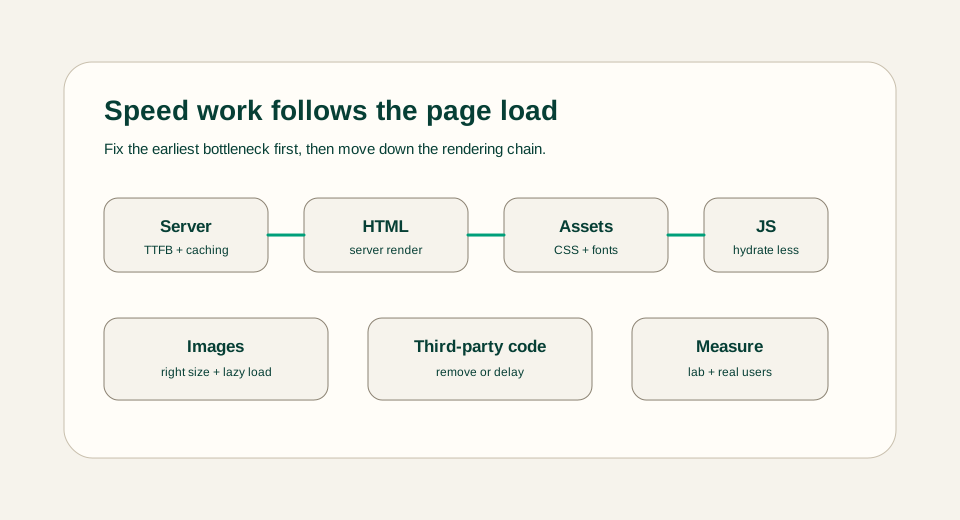
Website speed work is easier when you follow the order of the page load. Start with the server response, then HTML, render-blocking assets, JavaScript, images, fonts, caching, and measurement. Fixing late problems before early bottlenecks usually wastes effort.
Measure before changing code
Use a repeatable baseline before optimizing. Check the homepage, the main article template, a tool page, and any heavy page. Record the main bottleneck for each page so changes target a real problem.
Start with server response and HTML
A slow server response delays everything else. Use static generation when content is known ahead of time, keep database calls out of static article routes, and send useful HTML before optional interactive code loads.
- Pre-render stable content pages.
- Keep article rendering server-first.
- Avoid client-only rendering for pages that can be useful as HTML.
- Check redirects and middleware when the first response is slow.
Reduce JavaScript that readers do not need
Every Client Component adds JavaScript work. Keep interactive logic focused on tools, forms, filters, and controls that need browser state. Article layouts, content access, related posts, and static sections should stay server-first when possible.
Optimize images, fonts, and CSS
Images should be the right size for their container, compressed, and lazy-loaded when they are below the first viewport. Fonts should be limited and loaded in a way that avoids layout shift. CSS should support the design without becoming a large unused payload.
- Use SVG for diagrams when the artwork is mostly shapes and text.
- Avoid huge decorative images that do not help the reader.
- Keep font families limited.
- Use stable dimensions for images, cards, and tool panels.
Be careful with third-party scripts
Analytics, embeds, chat widgets, ads, and heavy tracking scripts can hurt speed quickly. Add them only when the site has a clear need, load them after the important content, and remove anything that is not producing useful information.
Cache, verify, and watch real pages
Caching helps when the same content is requested repeatedly, but it should not hide broken pages. After changes, check real pages on mobile and desktop, confirm no layout shifts are obvious, and compare the new measurements with the baseline.
Prioritize by user impact
Do not fix every score at once. Start with the page and device that matter most, then choose the bottleneck a real user feels first. A slow first response, a blocked hero image, a large JavaScript bundle, and a shifting layout are different problems. Each needs a different fix and a different verification step.
- If the first byte is slow, inspect hosting, cache headers, redirects, and server work.
- If the first viewport is late, inspect hero images, fonts, render-blocking CSS, and critical HTML.
- If interaction feels delayed, inspect JavaScript size, hydration work, and expensive client components.
- If the page jumps, inspect image dimensions, ad slots, font swaps, and dynamic content inserted above the fold.
Speed review example
For a blog page, the practical review might be: static HTML is served, the article title and summary appear without JavaScript, the hero visual has stable dimensions, diagrams are SVG, below-the-fold images are lazy, and only the search filter or tool interface ships client-side code. That is more useful than chasing a perfect score without knowing what changed.
Common speed mistakes
The most common mistake is optimizing what is easy to see instead of what is actually slow. Replacing a small icon will not fix a slow server response. Removing a paragraph will not fix a blocking script. Changing colors will not fix layout shift. Keep the diagnosis tied to the metric and the metric tied to what the user experiences.
- Do not lazy-load the main hero image when it is the LCP element.
- Do not ship animation libraries to pages that only need static content.
- Do not ignore mobile results because desktop feels fast on a strong connection.
- Do not add third-party widgets before measuring their cost.
Final recommendation
Optimize in loading order: server response, useful HTML, render-blocking assets, JavaScript, images, fonts, third-party code, caching, and measurement. This keeps performance work practical and prevents random tweaks from replacing real improvements.